The trading journal
that belongs to you.
Simply track with precision.
Consistently profitable stock and options trading needs a good trading journal. ThetaForge pulls your trades automatically from Interactive Brokers / CapTrader, computes returns on a time-weighted basis and shows what each strategy actually earns. No retyping, no spreadsheet upkeep, no subscription. Install, start, done: ThetaForge runs on your own computer, and your data never leaves it.
AGPL-3.0 · For Interactive Brokers and compatible introducing brokers

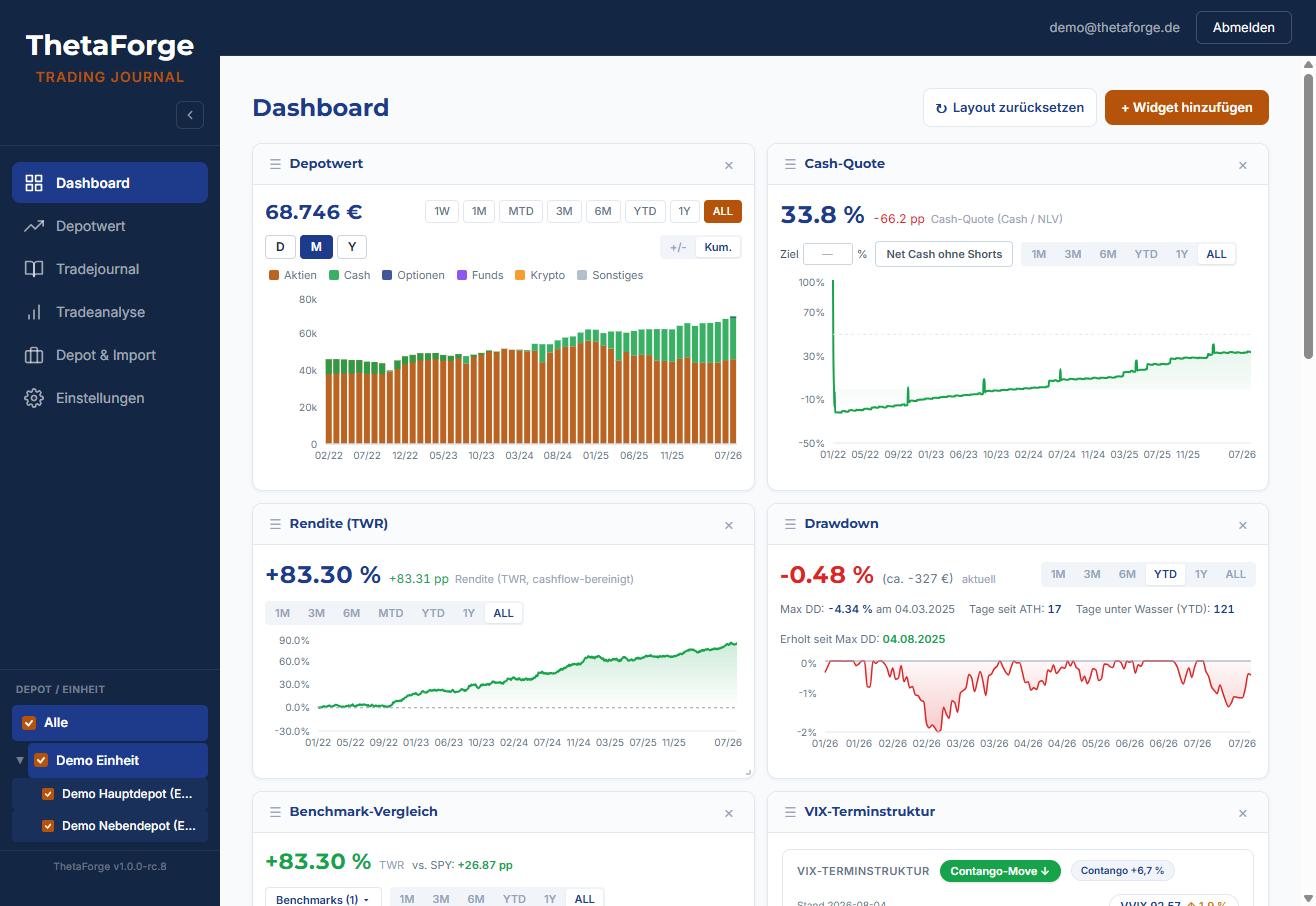
Dashboard with demo portfolio (synthetic data, ~€70k).
Track simply and precisely with ThetaForge.
A journal answers one question: what makes you money and what does not. To do that it needs two things: to stay current on its own and to compute correctly. A journal you have to maintain by hand stops being maintained after three weeks.
Automatic Flex Query import
Trades, premiums, dividends, fees and transfers – automatically from IBKR, with no retyping and no running TWS.
Time-weighted return (TWR)
Deposits and withdrawals do not distort your performance. Calculated the way professional asset managers report it.
Strategy tagging
Covered calls, CSPs, spreads, 0DTE – assign every position to a strategy and analyse by strategy, not just by account.
Dashboards & equity curve
KPI tiles, calendar heatmap, premium history – the state of your trading at a glance.
Multi-portfolio & multi-user
Several IBKR accounts in one instance, analysed separately and viewed together. And in the cloud variant several users with their own login – family or trading partners keep their journal on the same instance, each strictly limited to their own data; locally ThetaForge is meant for one person.
An import that knows the edge cases.
A journal is only as good as its data. ThetaForge processes the Flex Query data relevant to the journal, including typical edge cases – exactly the rows where spreadsheets fail.
- Account transfers, stock splits, foreign currencies are detected reliably and correctly
- Assignments, exercises and expirations are booked as what they really are
- Corporate actions, transfers, currencies flow cleanly into holdings and returns
- Multi-year history via an initial import, then kept current automatically
- A blank rather than a guess – missing data is never silently invented
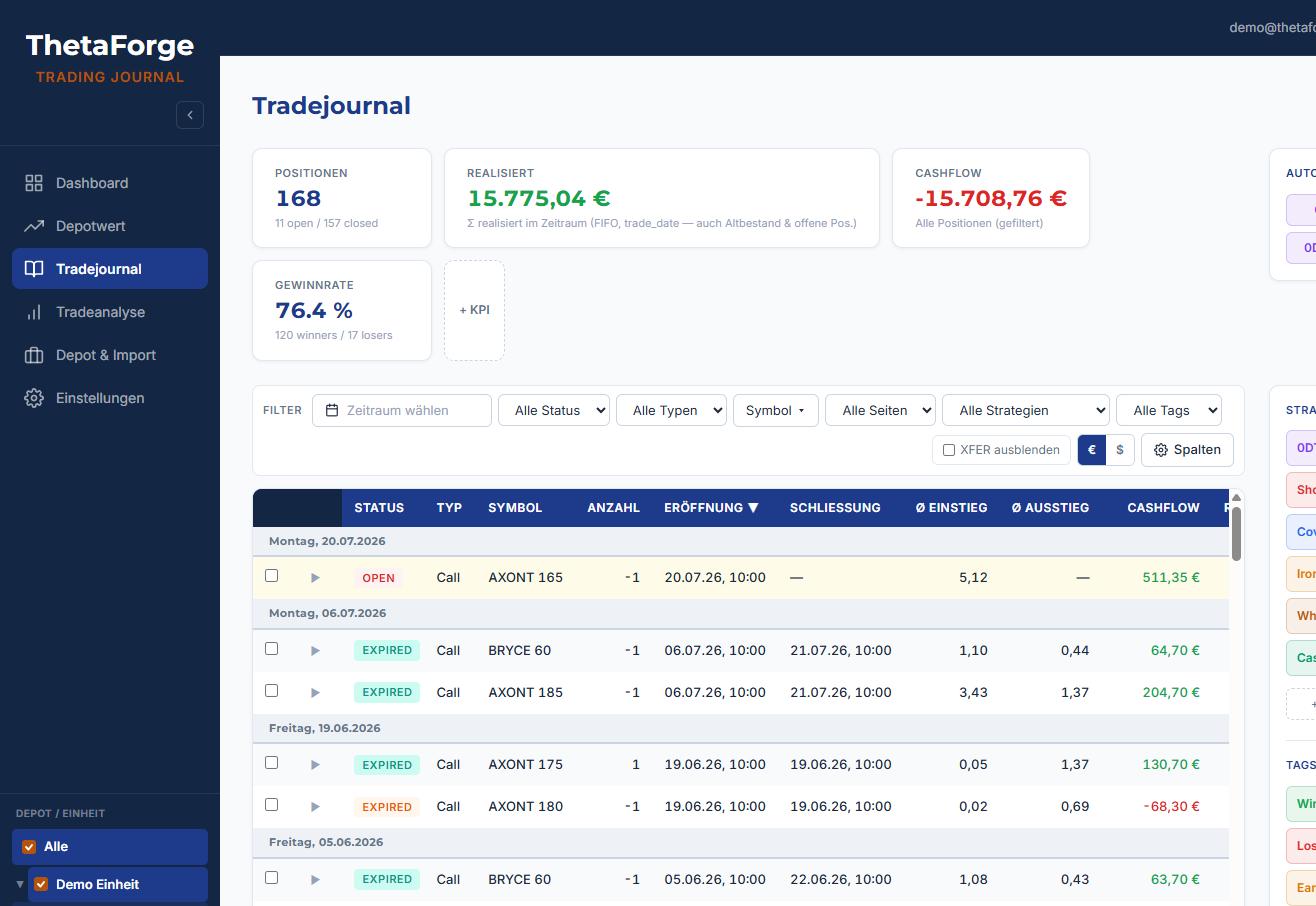
Numbers you can trust.
On simple portfolio curves, deposits look like phantom gains. ThetaForge computes on a time-weighted basis – the way asset managers account for performance.
- TWR, cash-flow adjusted – deposits and withdrawals distort nothing
- IRR as a second perspective – the time-weighted return measures the strategy, the money-weighted one your actual use of capital; ThetaForge shows both
- Drawdown analysis with depth, duration and recovery time
- Benchmark comparison – your portfolio against SPY & co., measured honestly
- Localised number formats in every view and every export
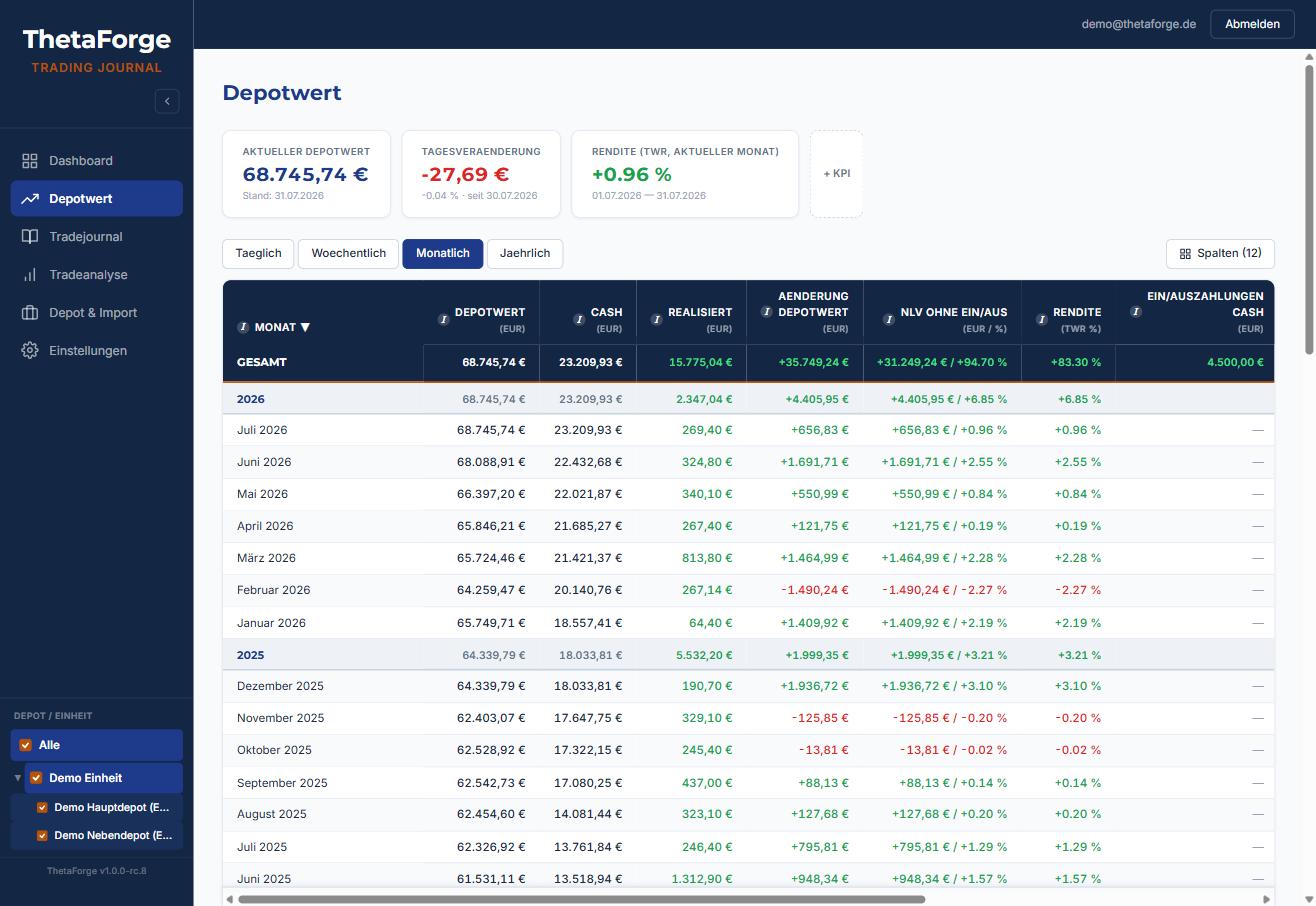
See which strategy makes the money.
A portfolio balance says nothing about whether the covered calls are working or the spreads are costing return. Only assignment by strategy makes trading manageable.
- Free tagging – assign every position to a strategy
- Analysis by strategy instead of just by account: premiums, win rate, result
- Period comparisons – month, quarter, year, since inception
- Trade journal & trade analysis as a searchable history of every decision
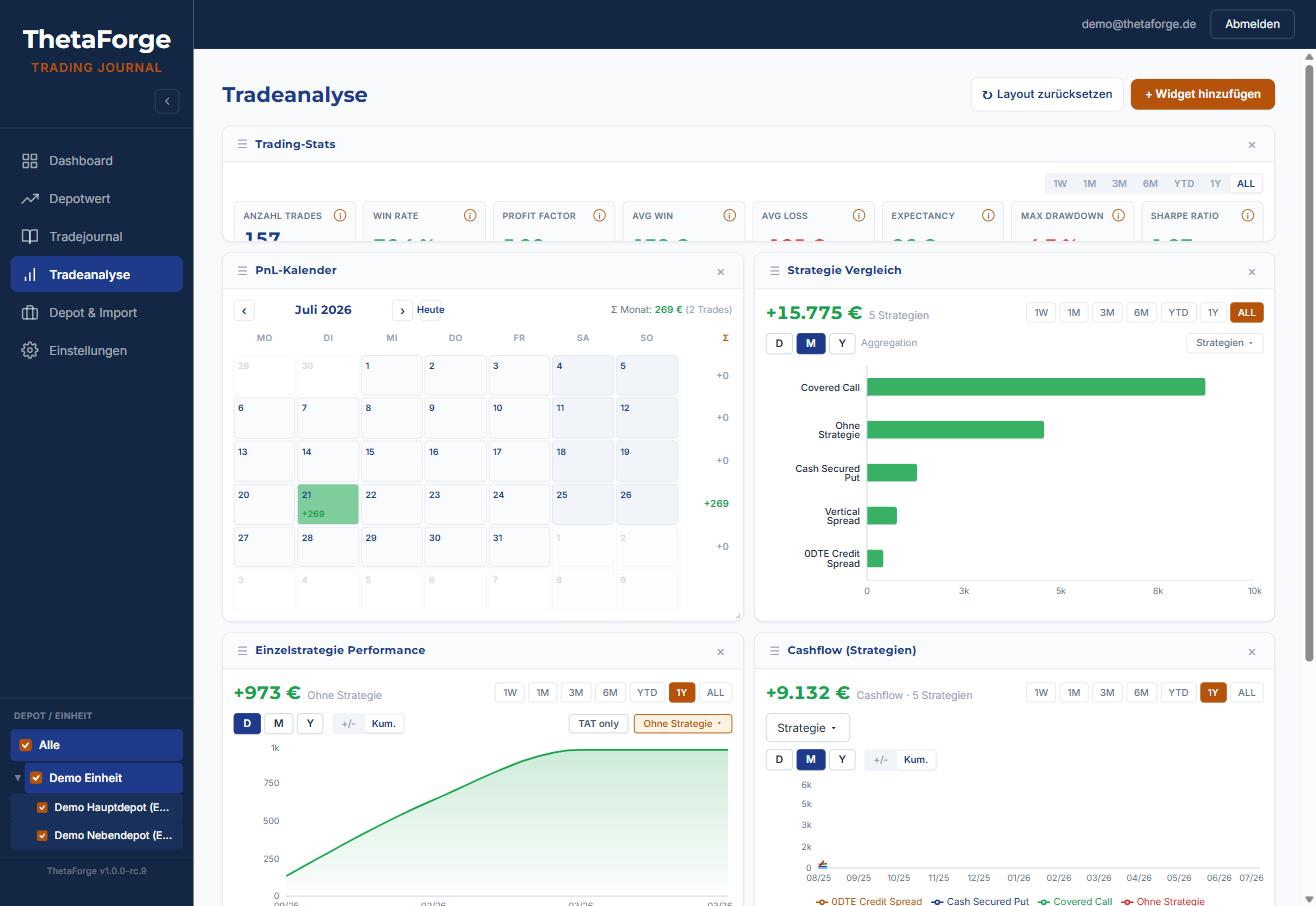
Your portfolio at a glance – the way you like it.
Widgets instead of rigid reports: you assemble the dashboard that answers your questions.
- Freely arrangeable widgets – portfolio value, premiums, heatmap, equity curve, drawdown and more
- Portfolio value by asset class – stocks, options, cash and more, switchable between euro and dollar
- Deposits and withdrawals in view – every capital flow captured cleanly and separated from performance
- VIX term structure with trend detection – market sentiment at a glance, right next to your own portfolio
- Time ranges in one click from a single week to the full history
- Multiple portfolios viewed individually or combined
You handle your own money with care – and so does ThetaForge.
Financial data demands more than a login. The security architecture is part of the core, not an option.
- Strictly read-only access – the Flex Query can report, never trade
- Row Level Security in the database – every row belongs to its owner
- Your computer, your data – stored locally, no telemetry; in the cloud variant you choose the hosting region yourself
Try the app in the demo portfolio.
No video, no sign-up: open the running ThetaForge instance with a synthetic demo portfolio and click through the dashboard, journal, strategy analysis and return calculation yourself. Everything is really computed, nothing embellished – just with fictional figures.
How to get ThetaForge.
For Windows there is a ready-made installer: download, install, start – done. On Mac, Linux, or with the source code, ThetaForge runs just as locally via one free helper program. If you would rather work from any device in the browser, run the same app in your own cloud. All three routes load ThetaForge from the public archive.
ThetaForge Desktop – installer for Windows
The complete app including its database runs locally on your Windows computer. No cloud account, no setup with third-party services – your trades stay on the machine. ThetaForge reaches the internet only to set itself up and to fetch your broker reports.
Download the setup file
The releases page on GitLab has the current version as the ThetaForge Desktop Setup for Windows, with a checksum file next to it for anyone who wants to verify it.
Dismiss the SmartScreen warning
Windows warns about the setup file because it is not signed. Click More info, then Run anyway, and installation continues normally.
Install and start
The wizard walks you through installation and sets everything up on the first start. ThetaForge then opens in a browser window – without a login. If the helper program Docker is not on the computer yet, the wizard installs it as well: the first run then takes noticeably longer, and a restart of the computer may be needed.
- ✓All data stays on your computer – nothing leaves it
- ✓No Vercel, no Supabase, no email account needed
- ✓Opens without a login; a password can be enabled optionally
- –Windows only; for Mac and Linux see below
- –The daily import runs only while the computer is on
- –Single user; backing up your data is up to you
ThetaForge Desktop – via Docker
On Mac and Linux, or if you would rather take the source code directly: install one free helper program, download ThetaForge, run the starter.
Install Docker Desktop
One free helper program, once. It runs ThetaForge and its database in small isolated boxes – you never configure anything inside them.
Download ThetaForge
Open gitlab.com/thetaforge/thetaforge in your browser. Above the file list, on the right, is the Code button: click it, then under Download source code click zip. Unpack the file: you get a folder thetaforge-main; inside it a folder desktop, and in there the file ThetaForge starten — that is the one you need in the next step.
Run the starter
On Mac and Linux it is a short command from the guide; on Windows, double-click „ThetaForge starten“ – if you take the source code instead of the installer. The first start downloads the ready-built app, sets everything up and opens a browser window – without a login, entirely on your computer.
- ✓Runs on Windows, Mac and Linux
- ✓No Vercel, no Supabase, no email account needed
- –Docker Desktop must be installed
- –The daily import runs only while the computer is on
- –Single user; backing up your data is up to you
Run it in the cloud (web version)
The same app on the free tiers of Vercel and Supabase – worth it if you want to reach the journal from several devices, invite further users, or keep the daily import running while your computer is off.
- ✓Nothing to install, reachable in the browser from any device
- ✓The daily import runs automatically – even when your computer is off
- ✓Multiple devices and users possible
- –A Vercel and Supabase account is required (the free tier is enough)
- –Your data sits in your cloud – yours, but online
- –Initial setup around 30–60 minutes
Open source – the code is open for private use.
The licence is settled, and the archive is open.
Make it your own app
Missing a widget or an analysis that no vendor will ever build for you? Take your own fork and let your AI assistant add exactly what your trading needs – on a mature foundation instead of from scratch. No subscription product gives you that freedom.
Open source under AGPL-3.0
Every formula, every calculation is open to inspection. Forking and adapting privately is expressly allowed – the licence keeps the code free for good.
One author, a clear direction
The calculation core stays in one hand – that keeps quality and direction consistent. Bug reports are welcome. For one area, code contributions are expressly wanted too: connectors for further brokers and banks.
Name protected, code free
The word mark "ThetaForge™" is protected. The code is free – the name stands for the original and its stream of updates.
Status and outlook.
ThetaForge Desktop for Mac, Linux and source (via Docker)
The complete app including the database runs locally via Docker – with no Vercel and no Supabase account, all data stays on the machine. For Mac, Linux and anyone taking the source code, see Installation.
Web version in your own cloud
The same app on Vercel + Supabase, guide included – for access from several devices and for several users.
English interface
ThetaForge fully in English – same app, switchable language. Planned as one of the next updates, so that international traders too can use the journal in their language.
Installer for Windows
ThetaForge Desktop as an ordinary Windows program: download, install, get going – the installer sets up Docker in the background by itself, no setup of your own needed. The recommended route for Windows, see Installation.
Public archive on GitLab
Every version is traceable in the changelog. Suggestions and bug reports go via the GitLab issues or by email to kontakt@thetaforge.de – the roadmap is public. And if you develop yourself: connectors for further brokers and banks are expressly welcome as contributions.
Why ThetaForge exists.
Runs ThetaForge as an open source project and keeps developing it. Questions, feedback and bug reports are welcome by email to kontakt@thetaforge.de or via the GitLab issues.
ThetaForge is not a startup and not a subscription product. It grew out of a simple need: anyone who trades actively but has little time does not keep a journal by hand. So one was needed that maintains itself – with automatic import, correctly computed returns and analysis by strategy.
There are already several commercial trading journal solutions, but here ThetaForge has a few real distinguishing features.
The tool matured in real trading use, version after version, reconciled against real IBKR reports and their edge cases. Now the core is being opened up: open source, self-hosted, without a paywall. Development stays in one hand; that keeps quality and direction consistent.
ThetaForge is developed and maintained by its maintainer under the handle westkontor; reachable at kontakt@thetaforge.de.
Answered briefly.
I don't know GitLab – what is it, actually?
Do I need programming skills?
What is a Flex Query – and can ThetaForge access my account?
My account is not with Interactive Brokers – does it still work?
What does ThetaForge cost?
Where is my data stored?
Can I host my family on the same instance?
Is there support?
Can I help develop it or contribute features?
There is one exception: connectors for further brokers and banks. These import interfaces sit cleanly separated from the calculation core in their own directory, and contributions there are expressly welcome – your broker is missing and you can program? Then build it in. All that is required is an informal declaration of origin per commit (DCO,
git commit -s) – no contract, no assignment of rights: your contribution stays your work under AGPL-3.0. The details are in CONTRIBUTING.md once the public archive is open.Anyone who wants their own features beyond that may fork the project at any time and keep building it for themselves; the licence guarantees precisely that freedom.